Site Tracker
Alpha gameMaps & Navigation
4.569.00 Reviews
- Version
- 1.1.1
- Installs
- 100.00K
- Age Rating
- Everyone
Screenshots
Our Review of Site Tracker
 Analysis by Appyee
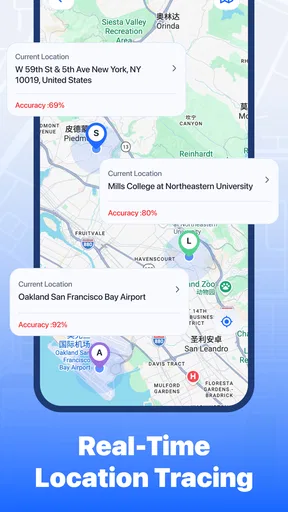
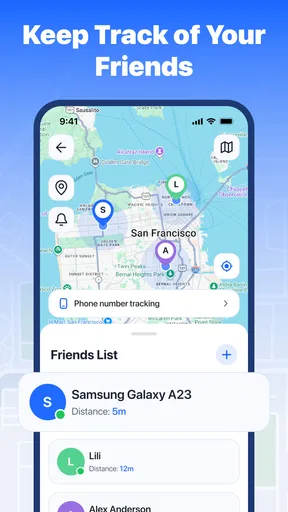
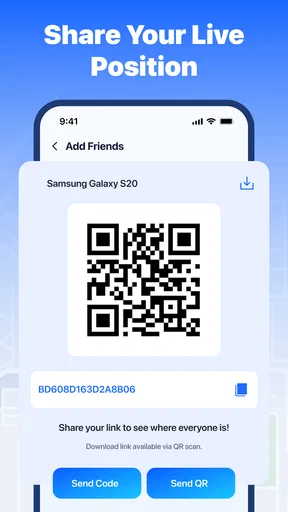
Keeping track of someone you trust can be useful, but it is also the kind of task where convenience and privacy have to stay balanced. Site Tracker is a free Maps & Navigation app from Alpha game that focuses on mutual, real-time location sharing and safety alerts between trusted friends. I see its appeal immediately: instead of treating location as a public profile or a passive map pin, it is designed around people who already know one another and want a practical way to stay connected.
After spending time with the app, my main impression is that its value depends less on how often you open it and more on whether you have a clear reason to share your whereabouts. It can make sense for a small group coordinating a journey, checking that a friend has arrived safely, or staying connected during an evening out. It is less suitable if you want a full navigation suite, a broad social network, or a location tool that runs without requiring careful agreement between participants.
Trust starts with a clear reason to share a location
Location information is unusually personal. A map can reveal where someone lives, works, studies, spends free time, or regularly visits. That makes the app’s central idea—mutual tracking among trusted friends—more reassuring than a setup based on unknown contacts. Still, the word “trusted” should be treated as a real condition, not a decorative label. I would only use it with people I would be comfortable telling where I am in real life.
The app has an average rating of 4.6 from around 185 ratings, and it has passed the ten-thousand-install mark. Those figures suggest that it has attracted a modest but positive early audience, rather than already being a universal location platform. I would read that as encouraging, not as proof that every workflow will suit every group. A small app can be perfectly useful, but I would still take a moment to understand how its sharing controls behave before relying on it for an important safety situation.
Its age rating is Everyone, which makes the interface approachable in principle, but an accessible rating does not remove the need for adult judgment around location sharing. Parents, guardians, and younger users should agree in advance about who may see the location, when sharing is appropriate, and what to do if a phone loses signal or battery. The app can support a communication plan; it should not become the entire plan.
That distinction matters in everyday use. If I were meeting a friend in a crowded city, I might use the app to help us find one another and to confirm that each person reached the next stop. If I were walking somewhere unfamiliar alone, I would also tell someone my route and expected arrival time through a normal message or call. Real-time tracking is helpful context, but it is not a replacement for direct communication or emergency services.
What the app is trying to do well
The strongest part of the concept is its narrow focus. Many map applications try to do everything at once: turn-by-turn directions, traffic information, business discovery, public transport, saved places, and location history. Site Tracker is easier to understand because the central purpose is keeping trusted people aware of one another’s current position and sending safety-related alerts.
That focus could make it useful for several specific routines. Friends attending a festival can use a shared view to avoid repeatedly asking for directions. A group on a road trip can check whether everyone is still together before leaving a stop. Someone expecting a late-night pickup can give a trusted person a way to follow progress rather than sending a series of manual updates. In each case, the benefit comes from reducing small coordination messages, not from replacing a complete navigation service.
I also like the mutual aspect of the idea. One-sided tracking can create an uncomfortable imbalance, especially when one person is expected to reveal their location while the other remains invisible. A mutual arrangement makes the exchange easier to discuss because everyone understands that location sharing is a shared choice. That does not automatically make it safe, but it gives the group a better starting point for consent.
Controls should be checked before the first real trip
Before using the app for anything important, I would create a simple agreement with the people involved. We would decide who belongs in the trusted group, what situation justifies an alert, and when the session should end. This is a small step, but it prevents a common problem with location tools: people begin sharing for one occasion and forget that the arrangement is still active later.
I would also check the visible controls rather than assuming that a familiar map interface explains everything. Look for the actions that start or stop sharing, identify who can view the current position, and confirm how an alert is triggered or dismissed. If a friend joins the group, I would verify that the invitation is intended for that person before accepting it. These checks are especially important when phones are shared, accounts are signed in on multiple devices, or several similarly named contacts appear in a list.
The current version is 1.0.9, and the app supports Android 8.0 and later. That makes compatibility reasonably broad for people using older Android phones, although location performance will still depend on the handset, its battery condition, network access, and system settings. A compatible operating system does not guarantee that every background behavior will work identically on every manufacturer’s device.
For that reason, I would test the app at home before depending on it outdoors. Ask a friend to move to another room or take a short walk, then confirm that the location updates and alerts behave as expected. Try the same test with the screen locked and with the phone connected to mobile data rather than Wi-Fi. This is one of the most useful practical checks because a feature that looks fine on a stationary phone may behave differently while the device is moving.
Battery, signal, and attention are part of the trade-off
Real-time location sharing naturally asks more from a phone than opening a map for a few seconds. GPS activity, mobile data, screen use, and notifications can all affect battery life, even when the exact impact varies by device and settings. I would start a tracking session with a reasonable charge and carry a power bank for a long outing. I would not begin a multi-hour trip with a nearly empty phone and assume the app can solve the problem.
Signal quality is another practical limitation. A location app cannot provide a dependable live picture when a phone has poor connectivity, blocked satellite visibility, or is switched off. In a crowded venue, underground station, rural road, or building with thick walls, updates may be delayed or unavailable. The right response is not to keep staring at the map; it is to agree on backup check-ins and meeting points before the journey begins.
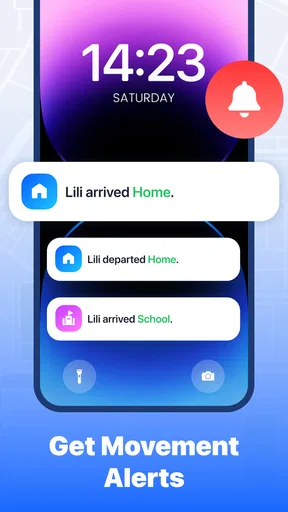
Notifications deserve attention too. Safety alerts can be valuable when they draw attention to a meaningful event, but too many alerts can make people dismiss them automatically. I would keep alert rules limited to situations the group actually cares about. If every minor movement produces noise, the important message may be overlooked. A smaller number of understandable alerts is usually more useful than constant interruptions.
Privacy decisions belong to the people using it
My cautious approach is to treat every location session as temporary unless I have a specific reason to keep it open. Start sharing when the agreed activity begins, stop when it ends, and confirm the change on the screen instead of relying on memory. If the app presents a visible status showing that sharing is active, I would make a habit of checking it at the end of the day.
I would also avoid adding people merely because they are available in a contact list. A trusted group should be small enough that everyone knows who is included. This is a non-obvious but important advantage of a deliberate setup: the fewer people involved, the easier it is to notice an unexpected participant or to discuss a change in the arrangement.
When using a location app, I pay attention to the choices it presents during setup and daily use. I want to know what I am enabling, which people can see the information, and whether I can stop sharing without asking another person to do it for me. If those choices are clear and easy to reach, I feel more comfortable. If they are hidden behind confusing screens, I would limit use to low-stakes situations until I understood the controls.
I would apply the same care to the phone itself. A strong device lock, updated operating system, and careful handling of invitations are basic protections that matter regardless of the app. I would not share screenshots of a live map in a public group, and I would avoid leaving a tracking session open on a phone that other people can casually use. The safest workflow is the one that combines the app’s visible controls with sensible device habits.
How it compares with ordinary alternatives
For a one-time “I’m here” message, a normal text or messaging app may be better. It is quicker, familiar to almost everyone, and does not require a continuous map view. If the only information a friend needs is that I arrived, sending a message is simpler than creating an ongoing tracking arrangement.
For turn-by-turn travel, a dedicated navigation app remains the better tool. Site Tracker’s purpose is awareness between people, not replacing detailed route guidance, traffic information, or transit planning. I would use a navigation app to decide how to get somewhere and use this app, when appropriate, to help trusted friends know where I am during that journey.
For families or organizations that need extensive account administration, established location platforms may offer a more mature set of controls. That can include clearer group management, longer operating history, or broader device support, depending on the service. The trade-off is that larger platforms can feel heavier and may encourage people to leave tracking enabled all the time. Site Tracker’s more focused concept may be preferable for a small friend group that wants a straightforward, activity-based arrangement.
The mutual model is the key point of comparison. A simple message gives no live context, a navigation app focuses on the route, and a broad family platform may offer more administration than a group of friends needs. This app sits between those choices: more informative than a single check-in, more focused than a full navigation suite, and dependent on trust rather than just contact availability.
Everyday situations where I would use it
Imagine four friends leaving a concert at different times. One person takes public transport, another walks, and two share a ride. Instead of sending repeated “where are you?” messages, they can use the shared location view while everyone is moving toward the meeting point. The useful part is not watching every step; it is noticing when the group has separated and deciding whether to change the meeting place.
In that situation, I would set a clear end point for sharing. Once everyone is together or safely home, the session should be closed. I would also keep a normal group chat available because a map does not explain why someone has stopped moving. A delayed position could mean a poor signal, a dead battery, or a deliberate pause; only a person can clarify the reason.
Another reasonable use is a short trip with a trusted friend who wants reassurance during the journey. I would share the route for the relevant period, agree that an alert means “please check in,” and avoid treating a missed update as immediate proof of danger. That prevents the app from creating unnecessary panic while still giving the friend a useful prompt to contact me.
I would not use it as a substitute for professional emergency response, nor would I depend on it to monitor someone who has not clearly agreed to participate. I would also avoid using it to pressure a friend into proving where they are. The mutual design works best when both sides can say no, pause sharing, or end the arrangement without conflict.
Who will appreciate it, and who should pass
I think the app is a good match for people who regularly coordinate in small groups and want more context than occasional messages provide. It may suit friends traveling together, people meeting in busy public places, or trusted contacts who want a simple way to stay aware during a particular activity. Its free price also makes it easy to try without turning the first experiment into a financial commitment.
It is less convincing for someone who only needs directions, sends occasional arrival messages, or wants a large community map. It is also not the right choice for anyone uncomfortable with live location sharing, even if the people involved are familiar. No interface can remove the personal sensitivity of revealing where you are.
Families with complicated schedules may want more structured controls than this focused app provides, while privacy-conscious users may prefer a manual check-in routine that reveals less information. On the other hand, people who find constant messaging tiring may appreciate the ability to share context during a defined outing and then return to normal communication afterward.
Alpha game has positioned the product as a Maps & Navigation app rather than a general social platform, and that distinction helps set expectations. I would judge it by whether it makes trusted coordination clearer, not by whether it replaces every map or communication tool on my phone.
My cautious recommendation
My recommendation is positive, with conditions. Site Tracker offers a focused answer to a real problem: helping trusted friends stay aware of one another in real time while giving safety alerts a place in the conversation. The concept is easy to understand, the app is free, and its Everyone rating makes it approachable for a broad audience. The current 1.0.9 release and Android 8.0 minimum also make it practical to test on many Android devices.
I would begin with a low-risk trial rather than using it immediately for a long or important journey. Add only people I genuinely trust, inspect every visible sharing and alert choice, test the behavior with the screen locked, and decide when the session will end. I would keep a phone charger, a backup contact method, and a simple meeting plan for situations where the map cannot update.
The app earns its place when live awareness is useful but a full navigation or family-management platform feels excessive. Its biggest strength is the mutual, friend-centered idea; its biggest responsibility is making sure that sharing remains intentional. If you are comfortable with that trade-off and have a clear everyday use for it, I think it is worth trying. If you want directions, occasional check-ins, or extensive privacy administration, a different tool will probably serve you better.
Privacy and Permissions
See what permissions an app requests and how it handles your data.
- Location
- approximate location (network-based), precise location (GPS and network-based)
- Camera
- take pictures and videos
- Wi-Fi connection information
- view Wi-Fi connections
- Other
- view network connections, full network access, run at startup, control vibration, prevent device from sleeping, Google Play license check
Verdict
Strengths of Site Tracker
- Tracks website uptime and availability from your mobile device.
- Sends alerts when a monitored site becomes unreachable.
- Simple dashboard makes multiple websites easy to manage.
- Useful response-time data helps identify performance issues.
- Supports quick checks without opening a desktop browser.
Limitations of Site Tracker
- Monitoring features may be limited without a paid subscription.
- Frequent checks can increase battery and mobile data usage.
- Alerts may arrive late when push notifications are restricted.
- Advanced analytics may feel insufficient for professional teams.
- Requires reliable internet access to receive timely status updates.
Similar Picks in This Category
View All
Uber - Request a ride
Uber Technologies, Inc.4.7


inDrive. Rides with fair fares
® SUOL INNOVATIONS LTD4.8

Yandex Go: Taxi Food Delivery
Mikromobilnost LLC Belgrade4.8

Bolt: Request a Ride
Bolt Technology4.8

Rapido: Bike-Taxi, Auto & Cabs
Rapido Bike Taxi4.8
Frequently Asked Questions
What is Site Tracker and what can I use it for?
Site Tracker is designed to help users monitor and organize information related to websites, pages, or online activity, depending on the version and features available in the app. It may be useful for checking site status, keeping track of selected pages, or receiving updates in one place. Before downloading, review the app description carefully because available tools can differ between Android and iOS versions.
Is Site Tracker free to download and use?
Site Tracker may be available as a free download, but some functions can require in-app purchases, a subscription, or a premium upgrade. Free access may also include advertising or limits on the number of tracked sites and notifications. We recommend checking the store listing for current pricing, trial conditions, renewal details, and cancellation instructions before starting any paid plan.
Does Site Tracker need special permissions or access to my device?
The permissions required by Site Tracker depend on how you use the application and which tracking features are enabled. It may request permission to send notifications, use background activity, access network connections, or store information locally. Review each permission request instead of accepting everything automatically, and check the privacy policy to understand what data is collected and why.
Can Site Tracker send notifications when something changes?
Notification support is one of the most useful reasons to install a tracking application, but the exact behavior depends on the selected monitoring options and the app version. Site Tracker may notify you about updates, status changes, or other tracked events when supported. Make sure notifications are enabled both inside the app and in your device settings, and remember that background restrictions can delay alerts.
Is Site Tracker safe and reliable for monitoring websites or online information?
Site Tracker can be convenient for organizing monitoring tasks, but no tracking app should be treated as a guarantee of real-time or uninterrupted updates. Reliability may depend on server availability, internet connectivity, website changes, and device battery-saving settings. Download it from an official app store, keep it updated, avoid entering unnecessary sensitive information, and verify important changes directly on the original website.
